
Juwa Backend Login: Fixes When the Panel Won't Open
Published · Gamebridge API
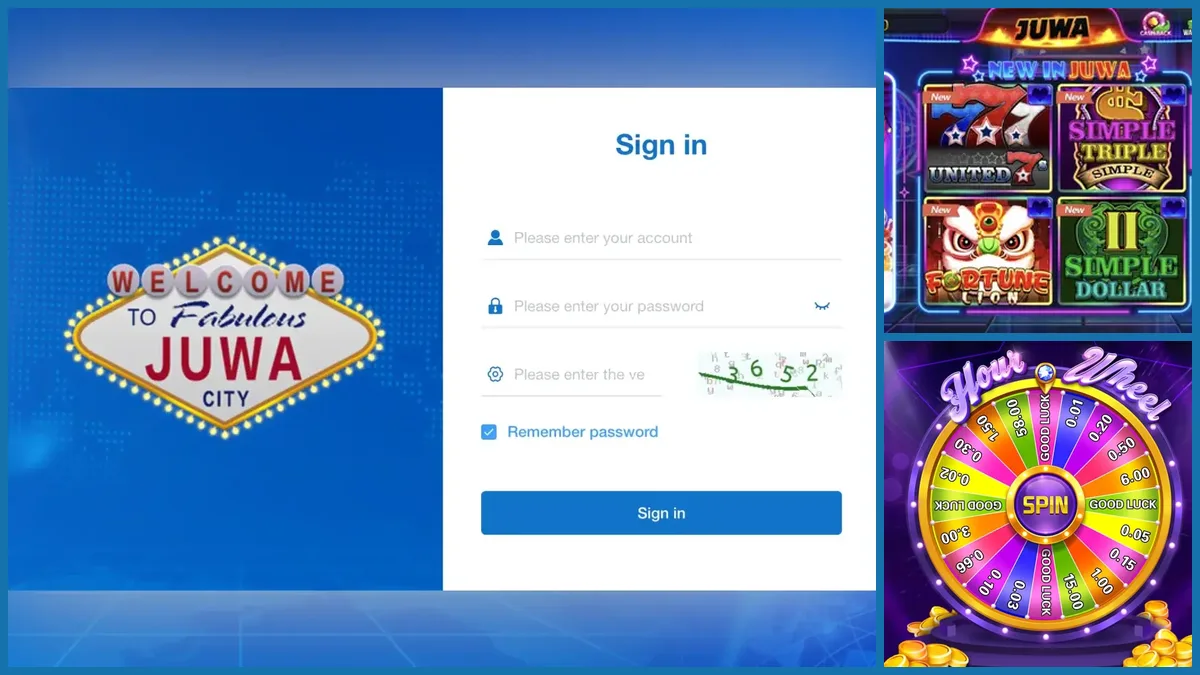
Short answer: the Juwa backend login is the agent sign-in page at ht.juwa777.com/login. You type the account name and password your supplier gave you, copy the verification code shown next to the third box and press Sign in. When it fails, the cause is nearly always one of five things: a wrong address, a typo in the account name, an expired code, a Juwa 2.0 login tried on the Juwa 777 panel, or a lock placed by the account above you. Below, we go through each fix in the order we check them for our own Juwa agents.
What the Juwa backend login screen looks like
Knowing the real page helps you spot a fake one. The genuine screen is simple.
- On the left, a blue panel with the "Welcome to Fabulous Juwa City" sign.
- On the right, a white form titled Sign in.
- Three boxes: your account, your password (with an eye icon to show what you typed) and a verification code.
- A small picture of the code, a Remember password tick box and one blue Sign in button.
Players never use this page. They sign in inside the Juwa app with the usernames you create for them. If a player sends you a screenshot of this form, they found a link meant for agents and should delete it.
Use the right address for your Juwa version
Two Juwa panels exist side by side, and each has its own door.
- Juwa (also written Juwa 777 or Juwa777): ht.juwa777.com/login
- Juwa 2.0: agent.juwa2.com/adminList
A login made on one panel does not open the other. The balances are separate too. If you are not sure which one your supplier set up, ask before you try again, because repeated failed attempts can lock you out. Our Juwa vs Juwa 2.0 comparison explains how the two differ.
Once you know your address, bookmark it. Our backend login links page keeps the panel addresses for every system we supply in one spot.
How to sign in, step by step
Follow this order every time. It takes under a minute.
- Open a current browser such as Chrome, Safari or Edge.
- Go to your bookmark, or type the address by hand. Do not tap a link from a stranger.
- Enter the account name exactly as you received it. Capitals and numbers count.
- Enter the password, then tap the eye icon to check it before you continue.
- Type the verification code from the picture. If it is hard to read, reload the page for a new one.
- Press Sign in and look at your balance first. It should match what you expect.
If the balance looks wrong, stop and message your supplier before you load any player.
Common Juwa backend login problems and quick fixes
Work down this list. Most agents are back in by the second item.
"Wrong account or password"
Copy and paste both values from the message your supplier sent. Look for a space at the end, a capital letter or a 0 typed as an O. Still failing? Ask for a password reset rather than guessing again.
The verification code is rejected
Codes go stale if the page sits open for a while. Reload, type the fresh code and sign in straight away. Some codes mix similar shapes, such as 5 and S, so take a second look.
The page will not load
Check the address letter by letter. Then try a second browser, or switch between Wi-Fi and mobile data. If nothing works, the panel address may have changed. Ask your supplier for the current one instead of searching for it.
You get in, but the panel looks wrong
You may be on the Juwa 2.0 panel with a Juwa 777 account, or the other way round. Go back to the address list above.
The account says locked or disabled
Only the account above yours can unlock it. For our clients, that is us. Send your account name, never your password, and we look into it.
Keep your Juwa login safe
A single typed password on a copycat page can empty your balance. These habits stop most problems.
- Skip search engines when you need the panel, even if the top result looks right. Look-alike pages can mimic the blue Juwa City form closely.
- Keep your password to yourself. If staff help you, ask your supplier for a separate staff or sub account.
- Untick Remember password on any shared phone or computer.
- Change your password right away if someone may have seen it.
- Remember that we never ask for your password in chat. Anyone who does is not us.
If you supply other sellers, the same rules apply to each login you hand out. Our Juwa sub distributor guide covers giving each store its own seat.
Signing in from your phone
The Juwa backend is a website, so it opens in a phone browser with no app to install.
Turn the phone sideways to see the full player list. Use your browser's "Add to Home screen" option on your bookmark so the right address is always one tap away. If the page looks squashed, zoom out rather than switching to a different link.
Many agents run the whole business from a phone. Just keep the phone locked with a passcode, since anyone holding it can open your panel when the password is saved.
Any Juwa news this week?
Before writing this on November 3, 2026, we searched for fresh Juwa announcements. We found no new panel address, rename or backend change from the last few days, so this is an evergreen guide.
App tracking sites do still list more than one Google Play app using the Juwa 777 name, each from a different publisher. We could not tie them to the team that runs Juwa. That is one more reason to share only the download link your supplier gives you, and to reach the backend through your own bookmark.
Get a Juwa backend login from us
New to Juwa? Start with how to become a Juwa agent, and see the full system details on our Juwa distributor and backend page. Running several games? The become an agent page lists every system we supply, and our distributor accounts page explains the higher levels.
Message us for price. You get an empty Juwa account to sign in to and check before any payment. Balances are prepaid only. Everything runs online, so agents in Pakistan, Nepal, India, the Philippines, Nigeria or anywhere else use the same steps.
See prices, backend details and screenshots on our Juwa distributor page.
FAQ
What is the Juwa backend login address?
For Juwa (Juwa 777) the agent sign-in page is ht.juwa777.com/login. Juwa 2.0 uses a separate panel at agent.juwa2.com/adminList. Confirm with your supplier which one your account belongs to.
Why does my Juwa backend login keep failing?
The usual causes are a typo in the account name or password, a stale verification code, the wrong panel for your Juwa version, or a locked account. Reload the page, paste your details and try once more before asking for a reset.
Can players use the Juwa backend login?
No. The backend is for agents, sub distributors and distributors. Players sign in inside the Juwa app with the username and password their agent creates.
Can I open the Juwa backend on my phone?
Yes. It is a website, so it works in any up-to-date phone browser. Bookmark the address and lock your phone with a passcode.
How do I get my own Juwa backend login?
Contact us on WhatsApp or call +1 (724) 466-2790, or email info@gamebridgedistributor.com. You get an empty Juwa account to check before any payment. Message us for price.
More guides
- Dragon Fury New Version: An Agent Update Checklist
- Create a Fire Kirin Account: How Agents Set Up Players
- Orion Stars Redeem: How Agents Handle Cash-Outs
- Create a Game Vault Account for Players: Agent Guide
- Orion Stars New Version: What Agents Should Do
- How to Become a Fire Kirin Agent: First Steps
- Panda Master New Version: What Agents Should Check
- Game Vault New Version: An Update Checklist for Agents
- Juwa New Version: Update or Juwa 2.0? Agent Guide
- Orion Stars Cashier Account: Staff Logins for Agents
- How to Become a Dragon Fury Agent in 2026
- Fire Kirin Sub Distributor: Running a Small Team
- Buy Panda Master Points: A Safe Guide for Agents
- Buy Orion Stars Points: How Agents Restock Safely
- Juwa Sub Distributor: How to Supply Your Own Stores
- How to Become a Game Vault Agent: 2026 Steps
- Dragon Fury Sub Distributor: Supplying Your Own Agents
- Panda Master VIP: What Agents Need to Know
- Fire Kirin New Version: What Agents Should Check
- Buy Juwa Points: A Prepaid Guide for Agents
- Game Vault Sub Distributor: Running a Seller Team
- Orion Stars Sub Distributor: Account Guide for 2026
- Dragon Fury Admin Account: Setup Guide for Agents
- Panda Master Sub Distributor: How the Account Works
- Buy Fire Kirin Points: A Safe Guide for Agents
- Juwa 2.0 Agent Account Setup: Your First Week
- Juwa vs Juwa 2.0: Which Should Agents Run?
- Game Vault 999 vs 777: What Agents Should Know
- How to Become an Orion Stars Agent: Step-by-Step
- How to Become a Panda Master Agent: 2026 Guide
- Vblink to Dragon Fury: Switching Guide for Agents
- How to Become a Fire Kirin Distributor in 2026
- How to Become a Juwa Agent or Distributor
- How to Buy Game Vault Points as a Distributor
- Fire Kirin Backend: How Agent Accounts Work
- Distributor vs Sub Distributor vs Store vs Agent
- Starting With Orion Stars: Setup Walkthrough for Partners